猎鹿人餐馆已经准备了一个 Unity客户端(以下简称 客户端),需要你使用 Uart 与客户端进行通信,并将你在开发板上的操作反映到客户端里。好消息是,一个现成的 Uart 模块已经在框架中为你准备好。你只需要以此为基础,在你的开发板上实现一套与客户端对应的应用层协议。
The GenshinHunter Restaurant has prepared a Unity software named GenshinKitchen.exe, and it requires you to communicate with the software using UART to reflect your actions on the development board in the software. The good news is that a ready-made UART module has been prepared for you. You only need to build a simple protocol on your development board that corresponds to the kitchen software, based on this module.
What is UART?
UART(通用异步收发传输器)是一种通信协议,在本项目中充当了客户端和开发板交互的渠道。
UART(Universal Asynchronous Transceiver Transmitter) is a communication protocol that acts as a channel for interaction between the client and the development board in this project.
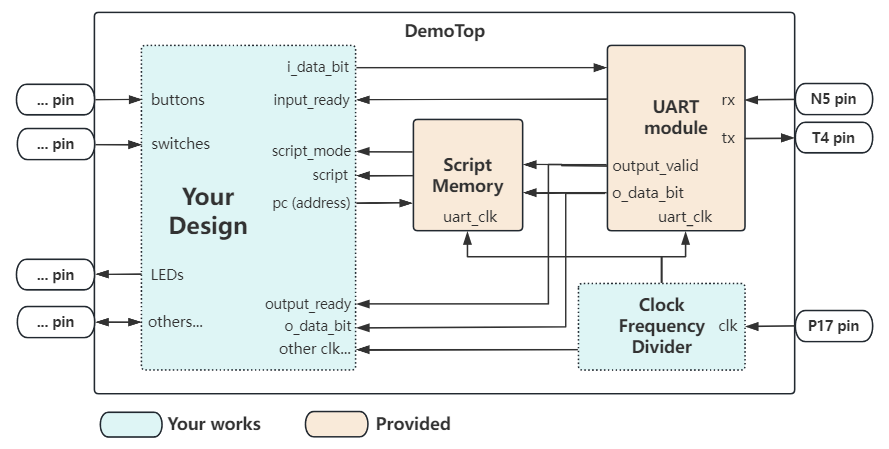
在该项目中,你不需要知道UART底层的工作原理是什么,而只需要使用封装好的UART模块,如上图(详细见 HDL framework -- UART module)。在图中,T4和N5管脚的另一端就连接着电脑客户端。
In this project, you do not need to know how the underlying UART works, but provide you with a encapsulated UART module as shown in the image above (see HDL framework - UART module). In the image, the other end of the T4 and N5 pin is connected to the client.
总之,你只需要知道:传入UART模块的内容(i_data_bit)会由客户端响应,而客户端的信号会由UART模块发给开发板(o_data_bit)。而本章节介绍的,是这些信号的规范。
Above all, all you need to know is that: The content passed into the UART module (io_dataIn) is responded to by the client, and the client's signal is sent by the UART module to the development board (io_dataOut). This section describes the specification of these signals.
Overview
我们会将整个协议分为两部分: 发送端协议(数据从开发板到客户端), 接收端协议(数据从客户端到开发板).
We will divide the whole protocol into two parts: the sender protocol(from board to client) and the receiver protocol(from client to board). Among them, the script transfer part of the receiver protocol is already provided in the framework, so students who are not interested can skip it.
UART模块是以Byte(8bit)为单位依次接受/发送数据的. 在这个简单的应用层协议中,绝大部分情况下最低2bit都被用于区分频道,而高6bit被用于传输具体数据.
The UART module receives/sends data in bytes (8 bits). In this simple application layer protocol, the minimum 2 bits are used to distinguish channels in most cases, and the high 6 bits are used to transmit specific data.
Note: what is channels(频道)?

Generally speaking, the channel is to distinguish between different signals on the same medium. For example, in a live broadcast, channel 1 May be the main venue camera, channel 2 is the sub-venue camera, and different clients will only accept the video data of a specific channel for playback.

In our project as well, different channels will be handled by different modules to achieve different types of functions.
基本频道区分如下,详情请查看该章节剩余的的文档.
Basic channels are divided as follows, see the rest of the documentation in this section for details.
| Roles | Channel | Description |
|---|---|---|
| Sender | XXXXXX00 | Ignored by Client. |
| Sender | XXXXXX01 | Change the game state. |
| Sender | XXXXXX10 | Let traveler perform specific operations. |
| Sender | XXXXXX11 | Let traveler change the target machine. |
| Receiver | XXXXXX00 | Should be ignored by Board. |
| Receiver | XXXXXX01 | Feedback signal from Client to Board. |
| Receiver | XXXXXX10 | Change into Script loading mode. |
| Receiver | XXXXXX11 | Unused. Should be ignored by Board. |
Important note
UART传输数据与客户端处理数据并反馈信号是需要时间的。
It takes time for the UART to transmit data and for the client to process the data and feedback the signal.
其中UART传输数据速率由波特率决定,而客户端更新反馈信号的速率固定为60Hz。
The UART transmission data rate is determined by the baud rate, while the client updates the feedback signal at a fixed rate of 60Hz.
因此,你有两个选择: 1. 在硬件需要反馈时等待客户端反馈信号。 2. 让你的处理单元使用足够慢的时钟(例如10Hz)。
So you have two options: 1. Wait for feedback signals from the client when the hardware requires feedback. 2. Have your processing unit use a slow enough clock (e.g. 10Hz).